A LEO pass is short. Depending on the orbit and the elevation the satellite reaches, you're looking at anywhere from a couple of minutes to maybe ten or eleven at best, and during that window the satellite is moving fast enough across the sky that a fixed antenna simply won't do. The downlink frequency is shifting the whole time too, and the link only closes for as long as the geometry allows. So “tracking a CubeSat” isn't really one problem — it's several problems that all have to be solved at once, on a clock that doesn't wait for you.
This post covers what actually goes into tracking a LEO satellite, then walks through the turnkey UHF/VHF/S-band ground station we use to do it. It's the same setup running at our station in Melderstein, Sweden.
What tracking actually involves
Knowing where the satellite will be. You start from a set of orbital elements, usually a TLE pulled from somewhere like CelesTrak, and propagate it forward with SGP4/SDP4 to get a predicted azimuth/elevation trajectory for the upcoming pass. This prediction gets less accurate the further ahead you push it, which is why stations tend to refresh their element sets often and plan on a rolling horizon rather than committing to a schedule weeks out.
Actually pointing at it. A satellite crossing overhead doesn't move at a steady angular rate. It's slow near the horizon and can swing through several degrees per second near zenith, as the same physical speed gets compressed into a much tighter angular arc. The rotor has to keep up with that, which means the control loop's responsiveness ends up mattering just as much as how much gain the antenna has — a great dish pointed slightly the wrong way isn't doing you any good.
Doppler. Because the satellite's moving at orbital velocity relative to the ground, the frequency you receive keeps drifting throughout the pass — up as it approaches, back down as it recedes. On UHF this can add up to several kHz of shift, which is enough to walk a demodulator's carrier loop right out of lock if nothing corrects for it. The fix is to predict the shift from the same orbital model driving the antenna and pre-compensate the receive (and transmit) frequency in step with it, so the lock holds for the whole pass and not just the middle of it.
Timing. AOS and LOS are hard deadlines. Antenna position, receiver tuning, recording, command sequencing — all of it needs to be ready before the satellite comes over the horizon, because there's no redo until the next orbit. This gets tighter still for CubeSats transmitting in bursts rather than a continuous carrier: the demodulator has to be tuned and ready to acquire within a short preamble, not just “sometime during the pass.”
Managing the RF path. Most small ground stations share one antenna between transmit and receive, which means something has to decide which path is live at any given instant and keep a transmit pulse from cooking a receive-only front end. It's a separate job from pointing or demodulation, and it's the kind of thing that only really becomes obvious once you're running a station in the field rather than reading about one.
None of this works in isolation. Good orbit prediction with a slow rotor still loses the satellite at high elevation. A fast rotor with no Doppler correction still loses the demodulator. Tracking a pass is really about getting several separate systems to stay coordinated against the same clock.
The ground station architecture
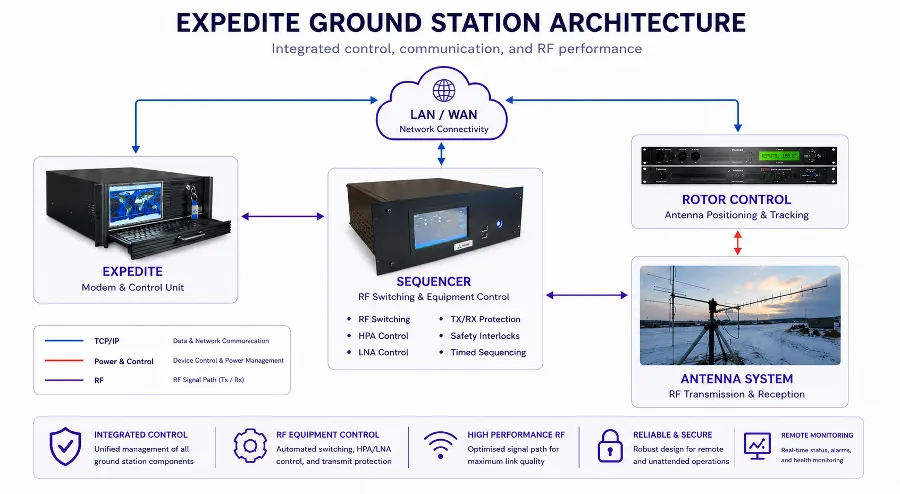
Turnkey UHF/VHF/S-band ground station architecture: Expedite, Sequencer, Rotor Control, and Antenna System.
This is the same turnkey UHF/VHF/S-band ground station we deploy for university and agency missions, built around four blocks tied together over TCP/IP, RF, and power/control links, as shown in the diagram above.
Expedite is the modem and the brains of the operation. It runs the orbit propagation, builds the pass schedule, drives antenna pointing (it can generate the angle commands itself or take them from an external source), pre-compensates for Doppler on both TX and RX, and does the actual demodulation and encoding. Everything else in the station takes its orders from here, over TCP/IP.
Sequencer sits between Expedite and the RF hardware and handles the stuff that needs hard, deterministic timing rather than general scheduling — switching between TX and RX, driving the HPA and LNA, and enforcing the TX/RX interlocks that keep a transmit pulse from damaging the receive chain. It takes control packets from Expedite and executes them with the kind of timing precision RF switching demands, which is deliberately not the modem's job.
Rotor control is the link between Expedite's pointing output and the physical positioner. It takes the azimuth/elevation targets and drives the rotor to follow them in real time, including through the fast angular rates near zenith.
The antenna system — in this case cross-polarized UHF and VHF Yagi arrays plus an S-band mesh dish — is what actually sends and receives the RF. Everything upstream exists to point it correctly and make sense of what it picks up.
The three link types in the diagram map onto this pretty cleanly: TCP/IP carries data between Expedite, the Sequencer, and the network; power/control lines run device control and power management, mainly between the Sequencer and the rotor controller; and RF carries the actual signal between the Sequencer and the antennas. Keeping these separate rather than funneling everything through one interface is a big part of why the station can run unattended — a hiccup in one subsystem doesn't necessarily take the others down with it.
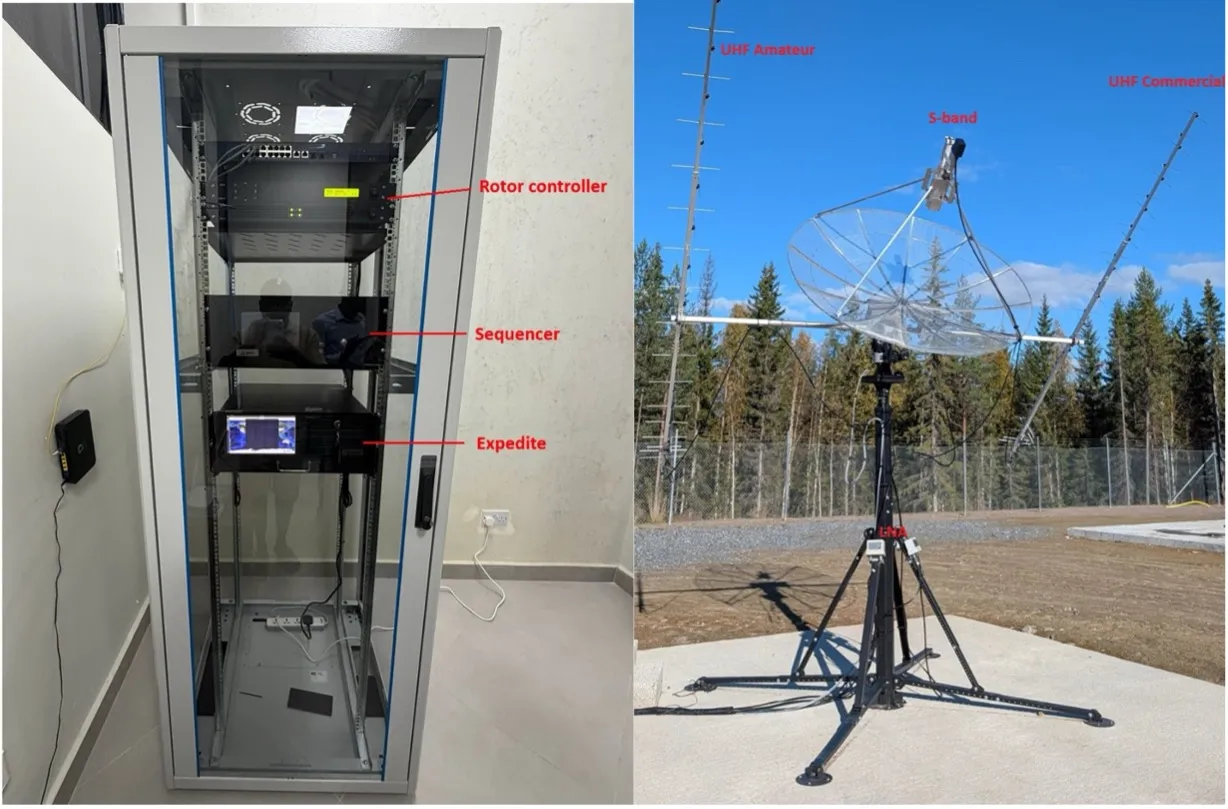
Photos of the actual Melderstein installation: the antenna array, the Expedite rack, the Sequencer, and the rotor controller.
Putting it to work: tracking FrontierSat
To make this concrete, here's how the architecture above plays out on an actual pass — tracking FrontierSat, a 3U CubeSat built by students at the University of Calgary and flown to a roughly 500 km sun-synchronous orbit in May 2026.
FrontierSat is a useful case for this station for two reasons. First, its downlink uses GOMSpace's Mode 5 with Golay-coded framing on UHF — a different demodulation problem from the G3RUH-based links we've worked with on other missions, which makes it a genuinely new test of the acquisition and decoding chain rather than a repeat of the same protocol under a different name. Second, its near-polar orbit plays directly to Melderstein's location: sitting well north of the Arctic Circle, this station sees satellites in sun-synchronous orbits far more often than a ground station closer to the equator would — in some cases several times a day. FrontierSat isn't just another pass; it's a mission this station is unusually well positioned to support.
Frame formats: nothing to build from scratch
Every downlink starts as raw bits, and before any of it means anything, the receiving side has to know where a frame begins and how it's laid out — where the sync marker is, how long the payload is, and where the error checking sits. Different manufacturers and standards structure this differently, which is normally something a ground segment team has to handle on a mission-by-mission basis.
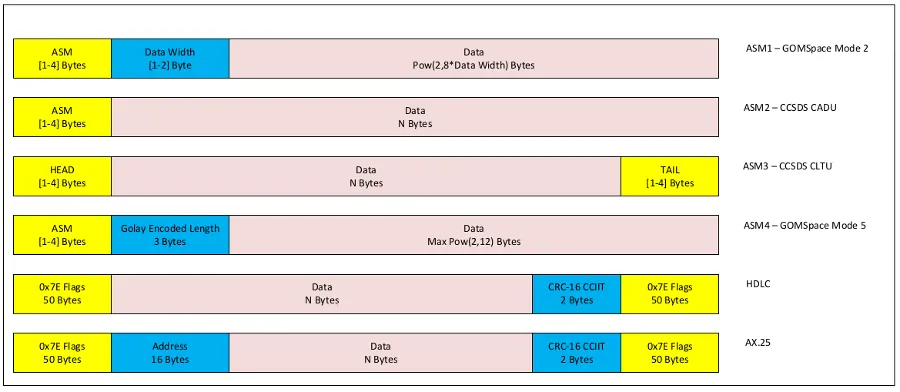
Frame formats supported by default: GOMSpace Mode 2, CCSDS CADU/CLTU, GOMSpace Mode 5, HDLC, and AX.25.
Expedite ships with the common ones supported by default, including the GOMSpace family, CCSDS CADU and CLTU, HDLC, and AX.25. FrontierSat's Mode 5 downlink is the fourth format in the diagram above — it uses an attached sync marker followed by a 3-byte Golay-encoded length field, which protects the length information itself against bit errors before the demodulator even knows how much data to expect. Because this framing is already built into Expedite, bringing up a new satellite that happens to use Mode 5 rather than, say, plain CCSDS CADU isn't a separate integration project — it's a matter of selecting the right frame format for the mission.
Getting the satellite loaded
Before any of this can happen, Expedite needs a current set of orbital elements for the target — everything downstream, pointing, Doppler prediction, pass scheduling, depends on having a good TLE. Normally this is a non-event: Expedite is configured to pull element sets automatically on a set interval from an online source, in this case CelesTrak.
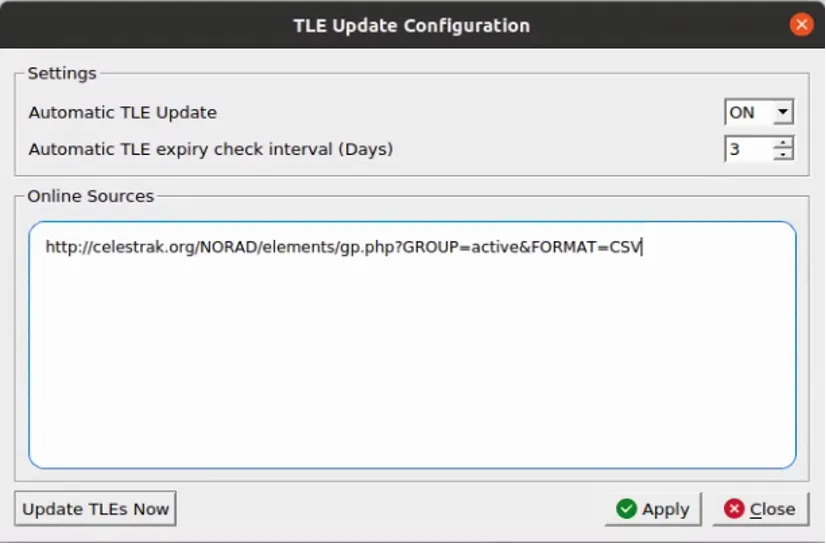
Expedite TLE Update Configuration: automatic TLE update enabled with CelesTrak as the online source.
On August 30, 2026, that automatic pull failed — CelesTrak was down for maintenance that day, not something in our control. This is exactly the kind of scenario Expedite is built to handle without stalling operations: alongside automatic fetching, it supports pasting elements directly from any other source. We pulled FrontierSat's current TLE from SatNOGS instead and loaded it manually.
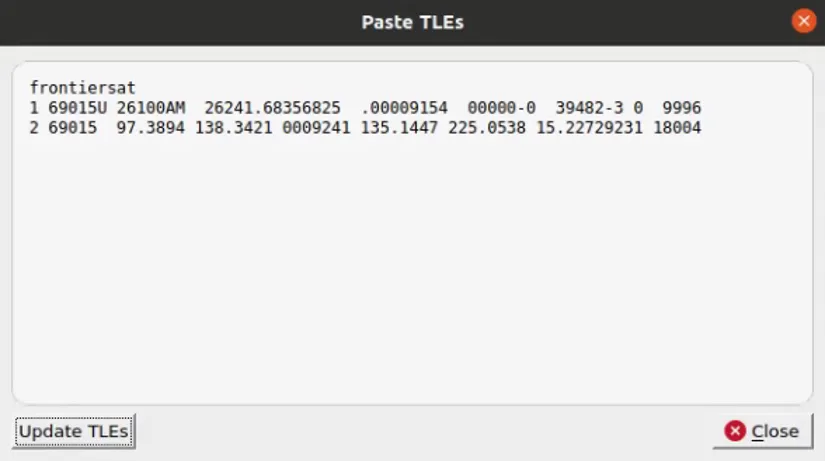
Expedite Paste TLEs dialog with FrontierSat's two-line element set entered manually.
With the element set loaded, Expedite immediately had what it needed to compute the satellite's position and generate pass predictions — next AOS/LOS, azimuth and elevation at each, max elevation, range, range rate, and the resulting Doppler shift at a 100 MHz reference.

Expedite Satellite Information panel showing computed pass parameters for FrontierSat.
From there, the pass scheduler laid out FrontierSat's upcoming windows for the day — several short, low-elevation passes typical of this orbit geometry as seen from Melderstein, each with its own AOS/LOS azimuth, max elevation, and duration queued up automatically.
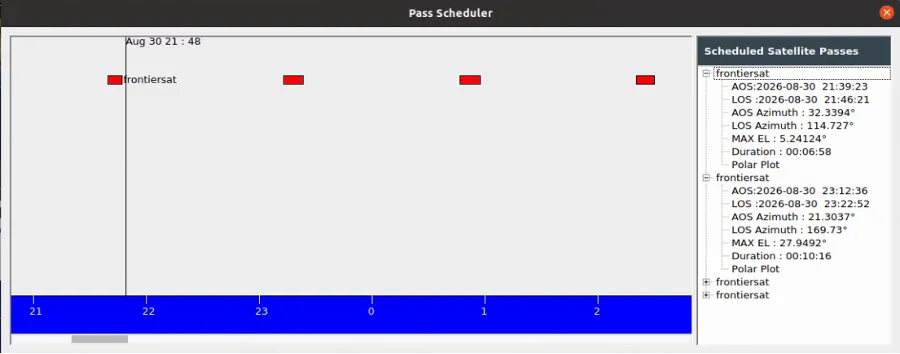
Expedite Pass Scheduler showing several scheduled FrontierSat passes.
Configuring the receiver
With the schedule set, the last piece before a pass is telling Expedite exactly how to demodulate and decode what comes in. This is where the frame format from earlier — ASM4, GOMSpace Mode 5 — gets paired with the actual RF and DSP parameters for FrontierSat's downlink.
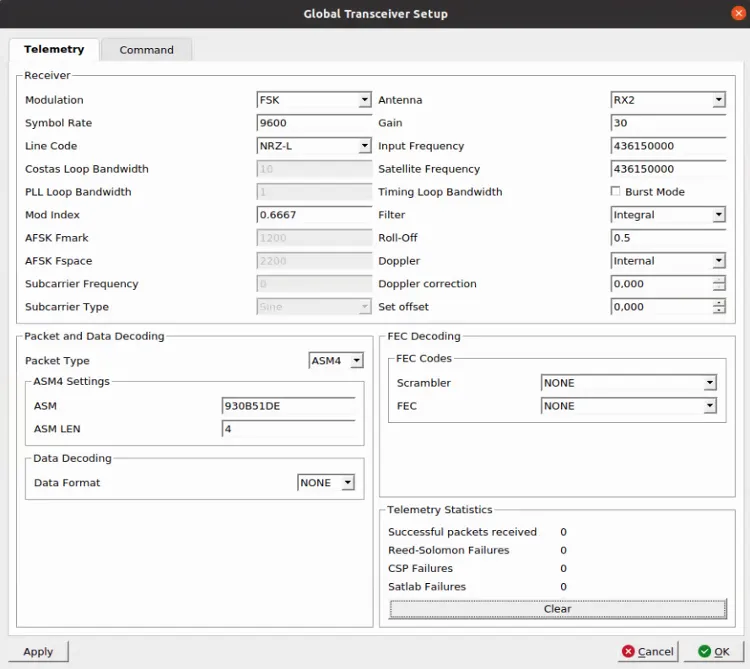
Expedite Global Transceiver Setup: FSK modulation, 9600 sps, ASM4 packet type, internal Doppler correction.
On the receiver side, this is set to FSK-family demodulation at 9600 sps with NRZ-L line coding, tuned to 436.150 MHz on RX2 — matching the input and satellite frequency, since no separate downconverter is offsetting the two. Doppler is set to Internal, meaning Expedite corrects the receive frequency in real time from the same orbital propagation used for antenna pointing, rather than relying on an external feed. On the decoding side, Packet Type is set to ASM4, with the attached sync marker and its length both configured to match FrontierSat's Mode 5 framing — the ASM word itself (930B51DE) and a 4-byte ASM length. No scrambler or FEC is applied at this stage, which is consistent with FrontierSat's frame structure not calling for one at the physical layer.
The Telemetry Statistics panel on the same screen is where the actual pass results show up once contact is established — successful packets received, and separate counters for Reed-Solomon, CSP, and Satlab decode failures, so it's immediately clear whether a link issue is happening at the RF layer or further up the decode chain.
Running through the pass end to end: orbit propagation from FrontierSat's element set feeds both the antenna pointing and the Doppler pre-compensation described earlier, Expedite tunes ahead of AOS and locks onto the Golay-coded Mode 5 downlink as the satellite comes over the horizon, and the Sequencer handles TX/RX switching if commanding is exercised during the same pass.
Results from the first pass
This is the first scheduled pass from earlier — AOS 21:39:23, LOS 21:46:21, max elevation 5.24° — run end to end with the configuration above.
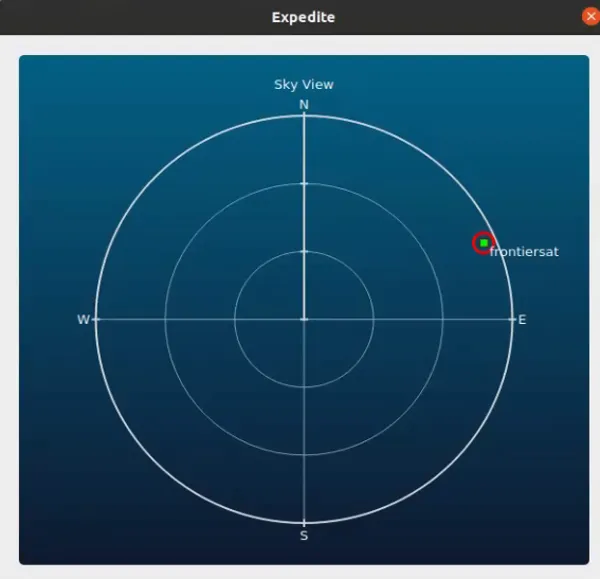
Expedite Sky View polar plot showing FrontierSat's position during the pass.
The Sky View gives a live polar plot of the satellite relative to the station, and it matches what the scheduler predicted: a shallow pass that never climbs far from the horizon, tracking roughly northeast to east rather than passing anywhere near zenith.
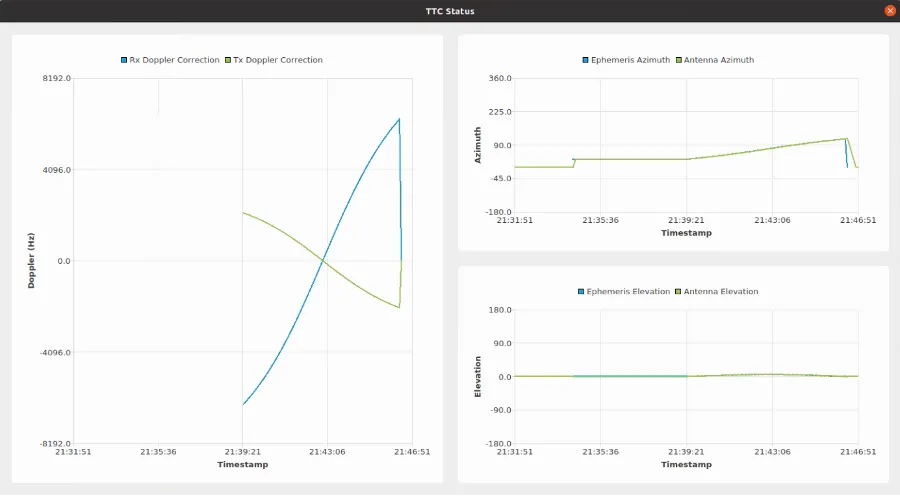
Expedite TTC Status: Rx/Tx Doppler correction and ephemeris vs. antenna azimuth/elevation tracking.
The TTC Status view is where the two problems described earlier — Doppler and pointing — show up as actual data rather than theory. The Doppler panel shows the receive correction sweeping through several kHz over the course of the pass, curving up as FrontierSat approaches and dropping back down as it recedes, with the transmit correction moving the opposite way — exactly the shape you'd expect from the geometry, not a straight line. The azimuth panel shows the antenna's actual pointing tracking the ephemeris-predicted trajectory closely for the whole pass, and the elevation panel stays low and flat throughout, consistent with a 5° pass rather than an overhead one.
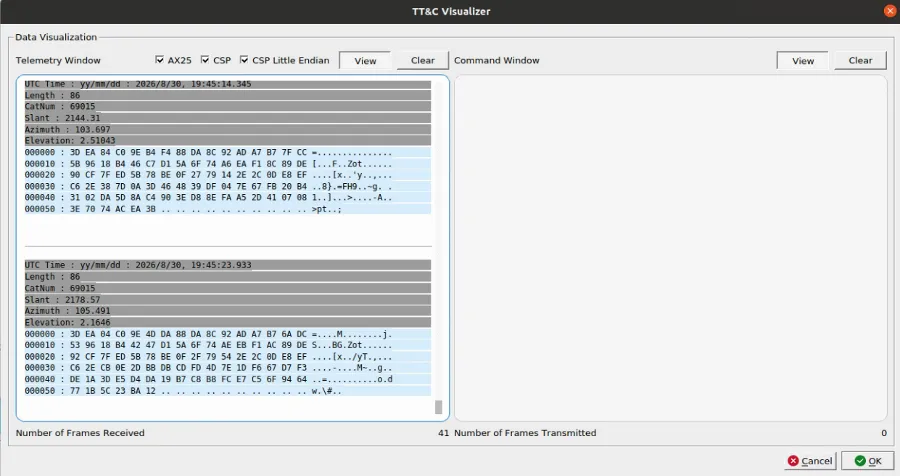
Expedite TT&C Visualizer showing decoded AX.25/CSP telemetry frames from FrontierSat.
And on the decoding side, the TT&C Visualizer shows the actual result: frames coming in with AX.25 and CSP framing decoded correctly, each one timestamped and tagged with the satellite's catalog number, slant range, azimuth, and elevation at the moment it was received. By the end of the pass, Expedite had logged 41 successfully decoded frames — the catalog number in each one (69015) matching the TLE loaded manually at the start, and no frames transmitted, since this pass was receive-only.
Consistency across multiple passes
One pass is a data point; letting the station keep working overnight gave us a lot more. Over roughly twelve and a half hours, FrontierSat came back over Melderstein eight more times, spanning everything from a 3.9° skim along the horizon to a pass that went almost directly overhead. Expedite's TTC Statistics view logs every one side by side, so the trend — and the outliers — are easy to see.
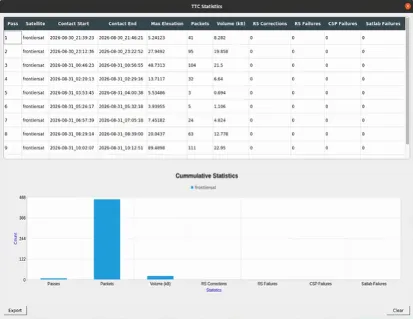
Expedite TTC Statistics table and cumulative statistics chart across nine FrontierSat passes ranging from 3.9° to 89.5° max elevation.
The elevation-vs-yield relationship holds up across the full set, not just the first three: the shallowest pass (3.9°) returned only 5 packets and 1.1 kB, while the highest-yield pass (48.7°) returned 104 packets and 21.5 kB — a shallow, grazing pass simply doesn't give the link enough time or a clean enough path to move much data, regardless of how well everything else is configured.
The most interesting entry in the table is pass 9: max elevation 89.5°, essentially straight overhead. This is the scenario described at the very start of this article — the point in a pass where angular velocity spikes and a positioner has to slew through its fastest, most demanding motion of the entire pass. It's also the single best-performing pass in the set: 111 packets and 23.0 kB, the highest of any pass that night. That the station's highest-elevation, highest-angular-rate pass was also its best-performing one is a reasonable proxy for the pointing loop keeping up rather than falling behind — a pass that let the antenna go into a slew wobble near zenith would show up here as a drop in packets, not a peak.
What stays flat across all nine passes, shallow or overhead, is the error columns: RS corrections, RS failures, CSP failures, and Satlab failures all read zero, every time. Across the full set, that's 478 packets and roughly 98.6 kB decoded overnight without a single logged decode failure — the more important number here, since it means the receiver stayed locked and the decode chain held up cleanly regardless of the geometry on any individual pass.
Why this matters in practice
For a university team or a small operator, the point of all this automation is that tracking complexity shouldn't turn into operational complexity. Once a pass is scheduled, orbit prediction, pointing, Doppler correction, and RF sequencing all just happen — nobody's hand-cranking an antenna or retuning a receiver mid-pass. That's worth more than it sounds like on paper: if your CubeSat only gets a handful of usable passes a day and your downlink budget is measured in kilobits, losing lock halfway through because of a missed Doppler correction or a late slew isn't a small thing. That data doesn't come back until the next orbit.
The FrontierSat passes above are one example of what that looks like end to end. The same architecture applies regardless of which mission it's tracking — what changes from satellite to satellite is the modulation, the framing, and how often a given orbit brings it over this particular station.